Goal
Build a complete CI/CD pipeline:
GitHub
   ↓
Jenkins
   ↓
Checkout
   ↓
Install & Test
   ↓
Build Docker Image
   ↓
Push to Docker Hub
   ↓
Deploy Application
Sample project:
https://github.com/VenkatMastercoder/jenkins-cicd-projects/tree/master/project-3-cicd-docker-deploy
Prerequisites
- Docker installed on the EC2 host
- A Docker Hub account
- Jenkins credential ID
dockerhub-credentials(previous lesson) - GitHub webhook optional but recommended
Application structure
project-3-cicd-docker-deploy/
├── .dockerignore
├── .gitignore
├── index.js
├── index.test.js
├── Jenkinsfile
├── Dockerfile
├── package-lock.json
└── package.json
Example Dockerfile pattern:
FROM node:18-alpine
WORKDIR /app
COPY package*.json ./
RUN npm install --production
COPY . .
EXPOSE 3000
CMD ["node", "index.js"]
Adjust COPY / CMD to match the real project layout in the repo.
Example CI/CD Jenkinsfile
pipeline {
  agent any

  environment {
    DOCKER_IMAGE = "yourdockerhubusername/my-app"
    DOCKER_TAG   = "${BUILD_NUMBER}"
    DOCKER_CREDENTIALS = 'dockerhub-credentials'
    EMAIL_TO = "your-email@gmail.com"
  }

  stages {
    stage('Checkout') {
      steps {
        echo "Pulling latest code..."
        checkout scm
      }
    }

    stage('Install & Test') {
      agent {
        docker { image 'node:18-alpine' }
      }
      steps {
        dir('project-3-cicd-docker-deploy') {
          sh 'npm install'
          sh 'npm test'
        }
      }
    }

    stage('Build Docker Image') {
      steps {
        dir('project-3-cicd-docker-deploy') {
          sh "docker build -t ${DOCKER_IMAGE}:${DOCKER_TAG} ."
          sh "docker tag ${DOCKER_IMAGE}:${DOCKER_TAG} ${DOCKER_IMAGE}:latest"
        }
      }
    }

    stage('Push to Docker Hub') {
      steps {
        withCredentials([usernamePassword(
          credentialsId: "${DOCKER_CREDENTIALS}",
          usernameVariable: 'DOCKER_USER',
          passwordVariable: 'DOCKER_PASS'
        )]) {
          sh 'echo $DOCKER_PASS | docker login -u $DOCKER_USER --password-stdin'
          sh "docker push ${DOCKER_IMAGE}:${DOCKER_TAG}"
          sh "docker push ${DOCKER_IMAGE}:latest"
        }
      }
    }

    stage('Deploy') {
      steps {
        sh """
          docker stop my-app || true
          docker rm my-app || true

          docker run -d \
            --name my-app \
            -p 3003:3000 \
            --restart unless-stopped \
            ${DOCKER_IMAGE}:${DOCKER_TAG}
        """
      }
    }
  }

  post {
    success {
      mail(
        to: "${EMAIL_TO}",
        subject: "SUCCESS: ${env.JOB_NAME} #${env.BUILD_NUMBER}",
        body: "Deployed ${DOCKER_IMAGE}:${DOCKER_TAG}\n${env.BUILD_URL}"
      )
    }
    failure {
      mail(
        to: "${EMAIL_TO}",
        subject: "FAILURE: ${env.JOB_NAME} #${env.BUILD_NUMBER}",
        body: "Check logs: ${env.BUILD_URL}"
      )
    }
    always {
      sh 'docker logout || true'
      sh 'docker image prune -f || true'
    }
  }
}
Set DOCKER_IMAGE and EMAIL_TO to your values. Align ports with the project's Dockerfile/EXPOSE.
Step 1 — Create the Pipeline job
- New Item → name
project-3-docker-cicd→ Pipeline → OK - Definition: Pipeline script from SCM
- SCM: Git → repo URL → credentials → branch
*/master - Script Path:
project-3-cicd-docker-deploy/Jenkinsfile - Enable GitHub hook trigger for GITScm polling
- Save → Build Now
Docker integration checklist
| Step | Command / action |
|---|---|
| Dockerfile | Defines runtime image |
| Docker build | docker build -t name:tag . |
| Docker tag | Also tag :latest |
| Docker login | withCredentials + --password-stdin |
| Docker push | Push version tag + latest |
| Deploy | docker stop/rm old container → docker run new |
| Cleanup | docker logout, prune dangling images |
Possible error — Docker-in-Docker
First builds often fail on Build Docker Image with:
docker: not found
script returned exit code 127
Finished: FAILURE
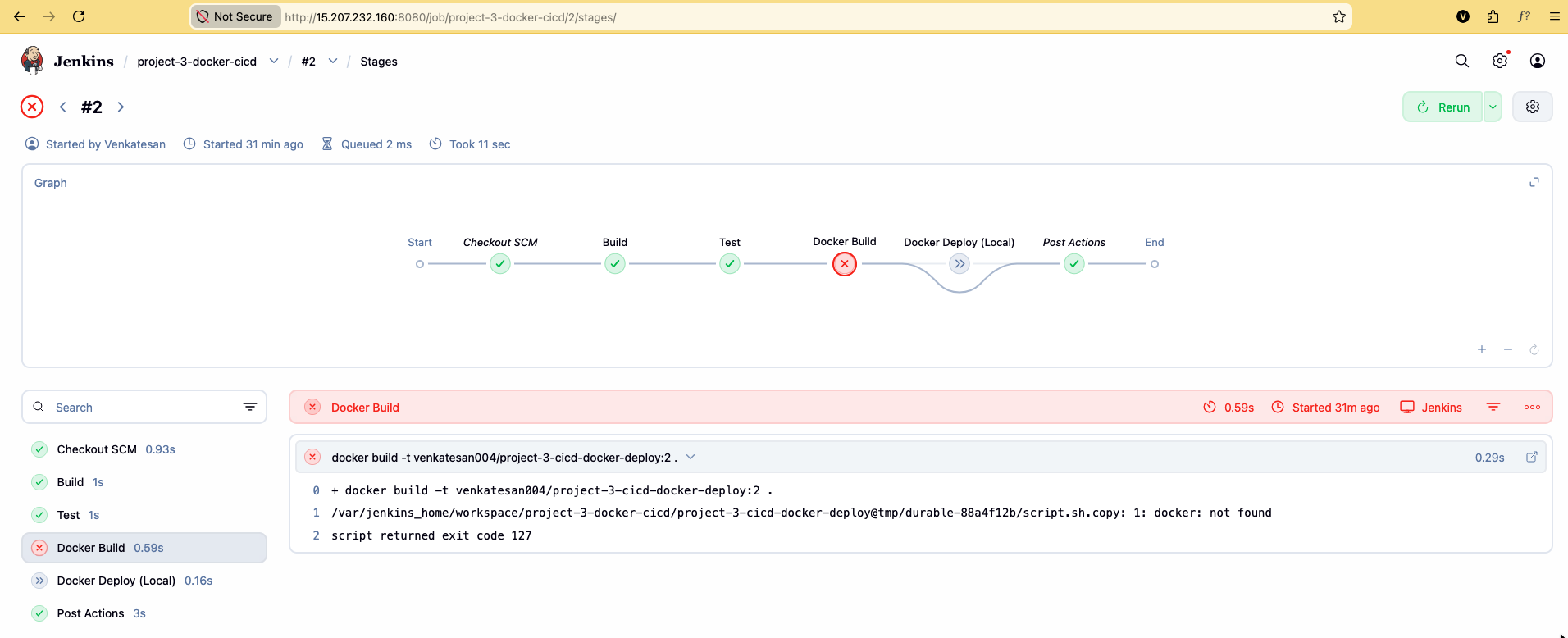
Why?
Jenkins runs inside a container. docker build looks for the Docker CLI inside that container, not on the EC2 host.
EC2 Ubuntu Host   ← Docker is installed here
    └── Jenkins Container
            └── docker build   ← not found
Fix — mount the host Docker socket
You do not need a nested Docker daemon. Share the host daemon with Jenkins.
1. Stop and remove the current container (configs stay in the volume):
docker stop jenkins
docker rm jenkins
2. Re-run with socket + CLI mounts:
docker run -d \
  --name jenkins \
  -p 8080:8080 \
  -p 50000:50000 \
  -p 3001:3001 \
  -v jenkins_home:/var/jenkins_home \
  -v /var/run/docker.sock:/var/run/docker.sock \
  -v $(which docker):/usr/bin/docker \
jenkins/jenkins:lts| Flag | Purpose |
|---|---|
-v /var/run/docker.sock:/var/run/docker.sock | Share host Docker daemon |
-v $(which docker):/usr/bin/docker | Provide Docker CLI binary |
3. Fix socket permissions:
docker exec -u root jenkins chmod 666 /var/run/docker.sock4. Verify:
docker exec jenkins docker ps
If you see containers listed, the pipeline can docker build, push, and run via the EC2 engine.
EC2 Ubuntu Host   ← Docker daemon
    └── Jenkins Container
            └── docker build  → host daemon via socket
            └── docker run    → container runs on EC2
Recreating the container drops packages installed inside it. Reinstall Node.js/PM2 only if Freestyle jobs still need them:
docker exec -u root -it jenkins bash
apt update && apt install nodejs npm -y
npm install -g pm2
exit
Re-run and access the app
- Build Now (or push a commit if webhook is set)
- Confirm stages: Checkout → Install & Test → Build → Push → Deploy
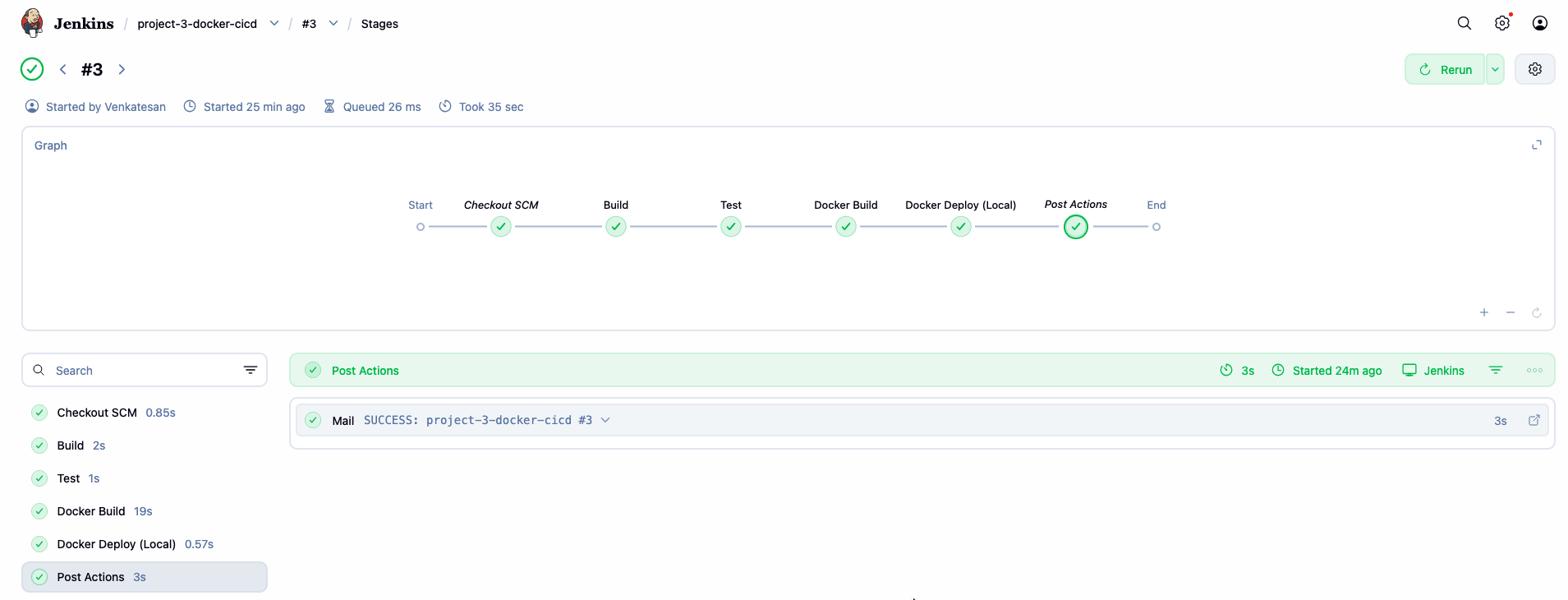
- Open:
http://<your-ec2-public-ip>:3003
(Use the host port you mapped in docker run.)
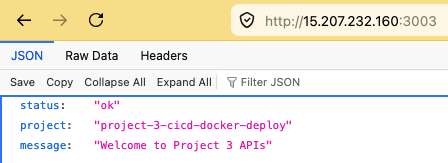
Full flow
Code Push
   ↓
GitHub Webhook
   ↓
Jenkins Pipeline
   ↓
Install + Test
   ↓
Build Docker Image
   ↓
Push to Docker Hub
   ↓
Deploy Container
   ↓
Live Application
You now have Jenkins + GitHub + Docker CI/CD. Day 4 adds Multibranch (when per branch), Master–Agent, and credential security practices.