What is a Multibranch Pipeline?
A Multibranch Pipeline automatically discovers branches in your repo and creates a separate pipeline for each branch that contains a Jenkinsfile. That lets you define different behaviors per branch in one file.
Why Multibranch?
| Without Multibranch | With Multibranch |
|---|---|
| One job per branch (manual) | Jenkins discovers branches |
| Easy to forget new feature branches | Feature branches get CI automatically |
| Duplicate job config | One Jenkinsfile, many branch jobs |
Branch-based CI/CD strategy
Development branch
Build → Test
Master / main branch
Build
 ↓
Test
 ↓
Docker Build
 ↓
Docker Push
 ↓
Production Deploy
Setting up the Multibranch job
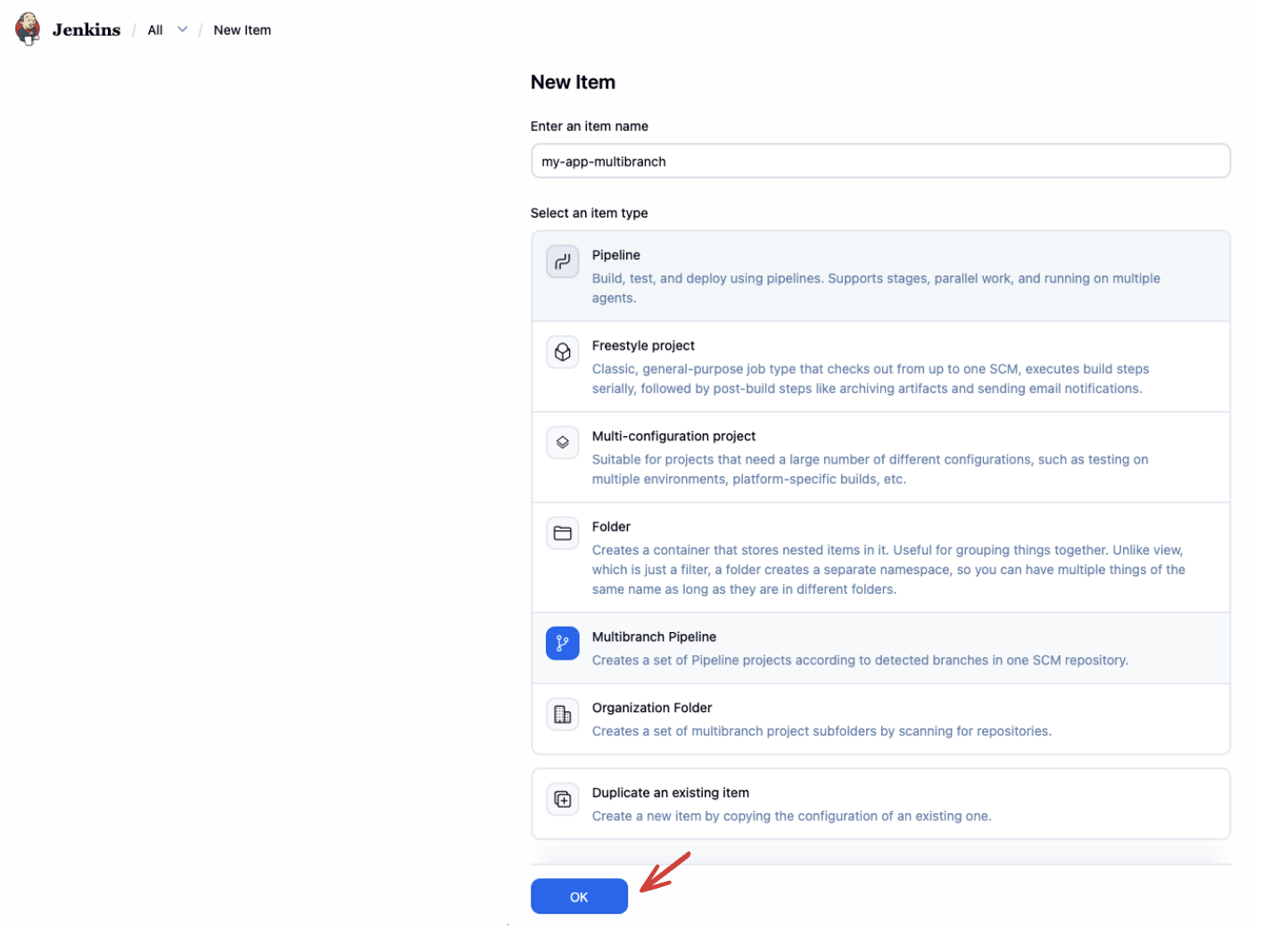
- New Item → name
my-app-multibranch→ Multibranch Pipeline → OK
- Branch Sources → Add source → GitHub (or Git)
- Point at your repo / credentials
- Set Script Path if needed:
project-4-multibranch-pipeline/Jenkinsfile
- Under Scan Multibranch Pipeline Triggers, enable Periodically if not otherwise run (and/or webhook-based scan)
- Save
Jenkins scans the repository and creates a job per branch that has a Jenkinsfile.
Sample project path:
https://github.com/VenkatMastercoder/jenkins-cicd-projects/tree/master/project-4-multibranch-pipeline
Jenkinsfile with branch-based logic
pipeline {
  agent any

  environment {
    PROJECT_DIR = "project-4-multibranch-pipeline"
    IMAGE_NAME = "yourdockerhubusername/project-4-multibranch-pipeline"
    IMAGE_TAG = "${BUILD_NUMBER}"
    CONTAINER_NAME = "project-4-multibranch-pipeline"
    EMAIL_TO = "your-email@gmail.com"
    DOCKER_CREDENTIALS = "dockerhub-credentials"
  }

  stages {
    stage("Build") {
      steps {
        dir("${PROJECT_DIR}") {
          sh '''
            echo "Build started!"
            echo "Branch: ${GIT_BRANCH}"
            echo "Build Number: ${BUILD_NUMBER}"
            npm install
          '''
        }
      }
    }

    stage("Test") {
      steps {
        dir("${PROJECT_DIR}") {
          sh "npm test"
        }
      }
    }

    stage("Docker Build") {
      when { branch 'master' }
      steps {
        dir("${PROJECT_DIR}") {
          sh """
            docker build -t ${IMAGE_NAME}:${IMAGE_TAG} .
            docker tag ${IMAGE_NAME}:${IMAGE_TAG} ${IMAGE_NAME}:latest
          """
        }
      }
    }

    stage("Push to Docker Hub") {
      when { branch 'master' }
      steps {
        withCredentials([usernamePassword(
          credentialsId: "${DOCKER_CREDENTIALS}",
          usernameVariable: 'DOCKER_USER',
          passwordVariable: 'DOCKER_PASS'
        )]) {
          sh '''
            echo "$DOCKER_PASS" | docker login -u "$DOCKER_USER" --password-stdin
            docker push ${IMAGE_NAME}:${IMAGE_TAG}
            docker push ${IMAGE_NAME}:latest
          '''
        }
      }
    }

    stage("Docker Deploy (Production)") {
      when { branch 'master' }
      steps {
        sh '''
          docker rm -f ${CONTAINER_NAME} || true
          docker run -d \
            --name ${CONTAINER_NAME} \
            -p 3004:3004 \
            ${IMAGE_NAME}:${IMAGE_TAG}
        '''
      }
    }
  }

  post {
    success {
      mail(
        to: "${EMAIL_TO}",
        subject: "SUCCESS (${env.GIT_BRANCH}): ${env.JOB_NAME} #${env.BUILD_NUMBER}",
        body: "Pipeline succeeded.\nBranch: ${env.GIT_BRANCH}\nURL: ${env.BUILD_URL}"
      )
    }
    failure {
      mail(
        to: "${EMAIL_TO}",
        subject: "FAILED (${env.GIT_BRANCH}): ${env.JOB_NAME} #${env.BUILD_NUMBER}",
        body: "Pipeline failed.\nBranch: ${env.GIT_BRANCH}\nURL: ${env.BUILD_URL}"
      )
    }
  }
}
If your default branch is main, change every when { branch 'master' } to when { branch 'main' }.
How the when directive works
when { branch 'main' }
when { branch 'dev' }
when { not { branch 'main' } }
when { anyOf { branch 'main'; branch 'staging' } }
when { environment name: 'DEPLOY_TO', value: 'prod' }
when { expression { return params.RUN_DEPLOY == true } }
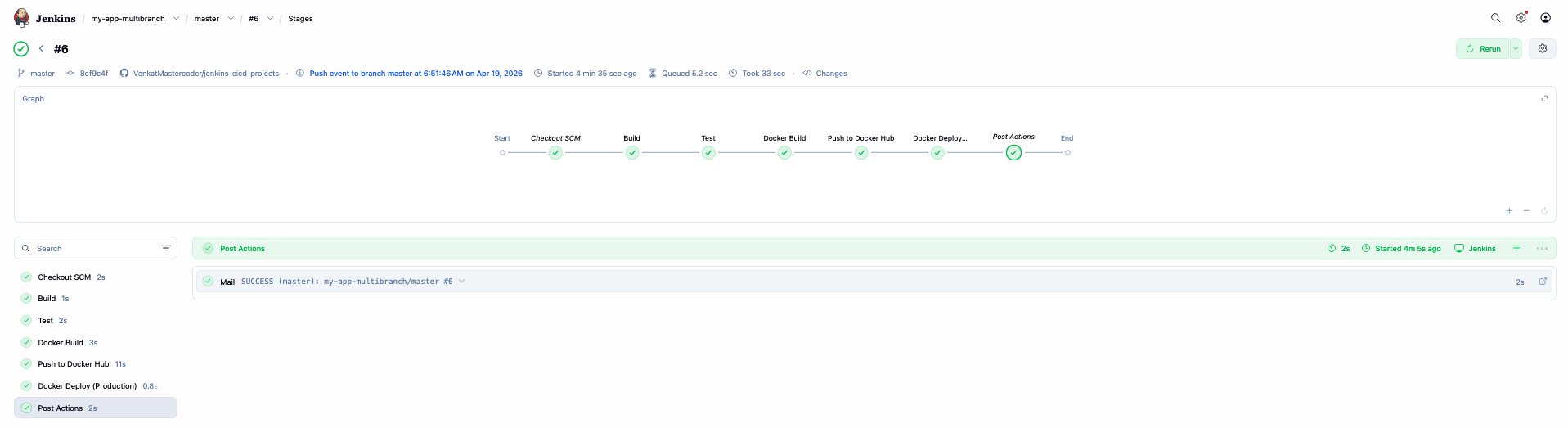
In this project, when restricts Docker build, push, and production deploy to master only. Feature/dev branches still get Build + Test.
Push to a dev branch and confirm Docker stages are skipped. Merge/push to master and confirm the full path runs.