Poll SCM vs GitHub webhook
| Poll SCM | GitHub webhook | |
|---|---|---|
| Latency | Minutes (schedule) | Seconds after push |
| Who initiates | Jenkins | GitHub |
| Network | Jenkins needs outbound to GitHub | GitHub needs inbound to Jenkins :8080 |
| API load | Repeated polling | Event-driven |
For local learning, Poll SCM is fine. For a real CI server, prefer webhooks.
Step 1 — Install the GitHub plugin
- Manage Jenkins → Plugins → Available plugins
- Search
GitHuband install (often already present from suggested plugins) - Restart Jenkins if required
Step 2 — Configure the job trigger
On your Pipeline (or Freestyle) job:
- Configure → Build Triggers
- Check GitHub hook trigger for GITScm polling
- Ensure Pipeline script from SCM (or Freestyle Git SCM) points at the correct repo
- Save
Step 3 — Add the webhook on GitHub
- GitHub repo → Settings → Webhooks → Add webhook
- Fill in:
| Field | Value |
|---|---|
| Payload URL | http://<your-ec2-public-ip>:8080/github-webhook/ |
| Content type | application/json |
| Events | Just the push event |
- Click Add webhook
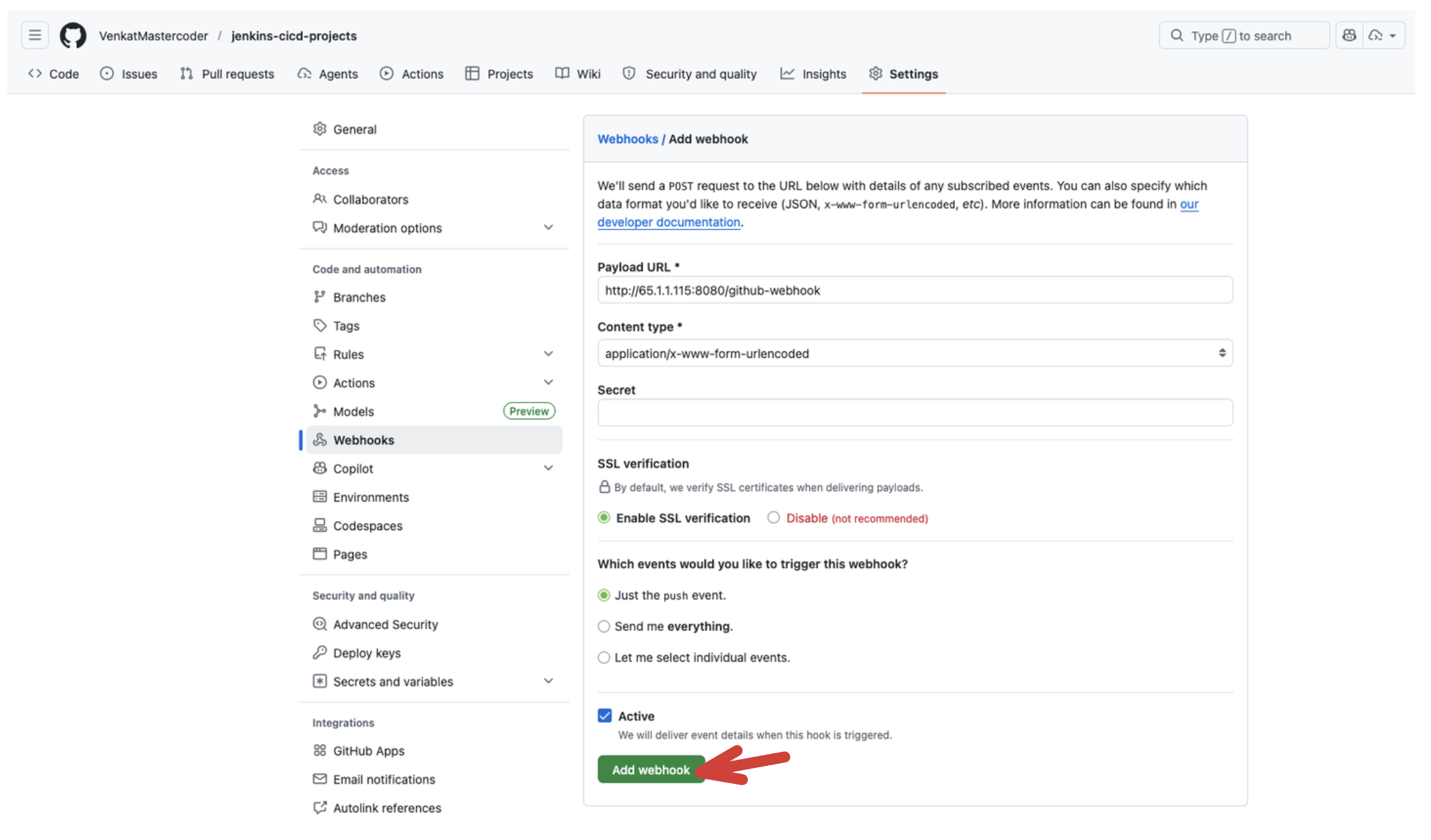
Trailing slash on /github-webhook/ matters.
Step 4 — Verify
- Make a small commit and
git push - On GitHub → Webhooks → recent delivery should be 200
- Jenkins should show a new build without clicking Build Now
If deliveries fail (timeouts), EC2 security group likely blocks inbound 8080 from GitHub. For labs, allow TCP 8080 from 0.0.0.0/0, or whitelist GitHub webhook IP ranges. Prefer locking this down outside of class.
Automatic Jenkins build checklist
- Plugin installed
- Job trigger checked
- Payload URL correct (public IP + path)
- Push event selected
- SG allows 8080
- Recent webhook delivery is green