Goal
Move from UI Freestyle jobs to Pipeline as Code. Build a Node.js Express project with install → test → PM2 deploy → email.
Sample path in the course repo:
https://github.com/VenkatMastercoder/jenkins-cicd-projects/tree/master/project-2-pipeline-jenkinsfile
App structure
project-2-pipeline-jenkinsfile/
├── .gitignore
├── index.js
├── index.test.js
├── Jenkinsfile
├── package-lock.json
└── package.json
Example Jenkinsfile
pipeline {
  agent any

  environment {
    PROJECT_DIR = "project-2-pipeline-jenkinsfile"
    PM2_APP_NAME = "project-2-app"
    EMAIL_TO = "your-email@gmail.com"
  }

  stages {
    stage('Preparation') {
      steps {
        sh '''
          echo "Build started!"
          echo "Branch: ${GIT_BRANCH}"
          echo "Build Number: ${BUILD_NUMBER}"
          ls -la
        '''
      }
    }

    stage('Install Dependencies') {
      steps {
        dir("${PROJECT_DIR}") {
          sh 'npm install'
        }
      }
    }

    stage('Run Tests') {
      steps {
        dir("${PROJECT_DIR}") {
          sh 'npm test'
        }
      }
    }

    stage('Deploy with PM2') {
      when {
        expression { currentBuild.currentResult == 'SUCCESS' }
      }
      steps {
        dir("${PROJECT_DIR}") {
          sh '''
            export PATH=$PATH:/usr/local/bin
            echo "Deploying app using PM2..."

            if pm2 list | grep -q "${PM2_APP_NAME}"; then
              echo "App exists -> Restarting..."
              pm2 restart "${PM2_APP_NAME}"
            else
              echo "App not found -> Starting..."
              pm2 start index.js --name "${PM2_APP_NAME}"
            fi

            pm2 save
          '''
        }
      }
    }
  }

  post {
    always {
      script {
        def buildStatus = currentBuild.currentResult ?: 'UNKNOWN'
        mail(
          to: "${EMAIL_TO}",
          subject: "Jenkins Build ${buildStatus}: ${env.JOB_NAME} #${env.BUILD_NUMBER}",
          body: """Build Notification

Job: ${env.JOB_NAME}
Build: #${env.BUILD_NUMBER}
Branch: ${env.GIT_BRANCH}
Status: ${buildStatus}
URL: ${env.BUILD_URL}"""
        )
      }
    }
  }
}
Update EMAIL_TO to your address. SMTP must already be configured from the post-build lesson.
Prerequisites
- Jenkins running (EC2 + Docker)
- Node.js and PM2 installed inside the Jenkins container (previous lesson)
- GitHub credentials configured
- Email / SMTP set up
If you skipped Project 1 installs, complete the Node.js + PM2 steps in Node.js Application with Jenkins first.
Step 1 — Create a Pipeline job
- Dashboard → New Item
- Name:
project-2-pipeline - Select Pipeline → OK

Step 2 — Pipeline script from SCM
- Definition: Pipeline script from SCM
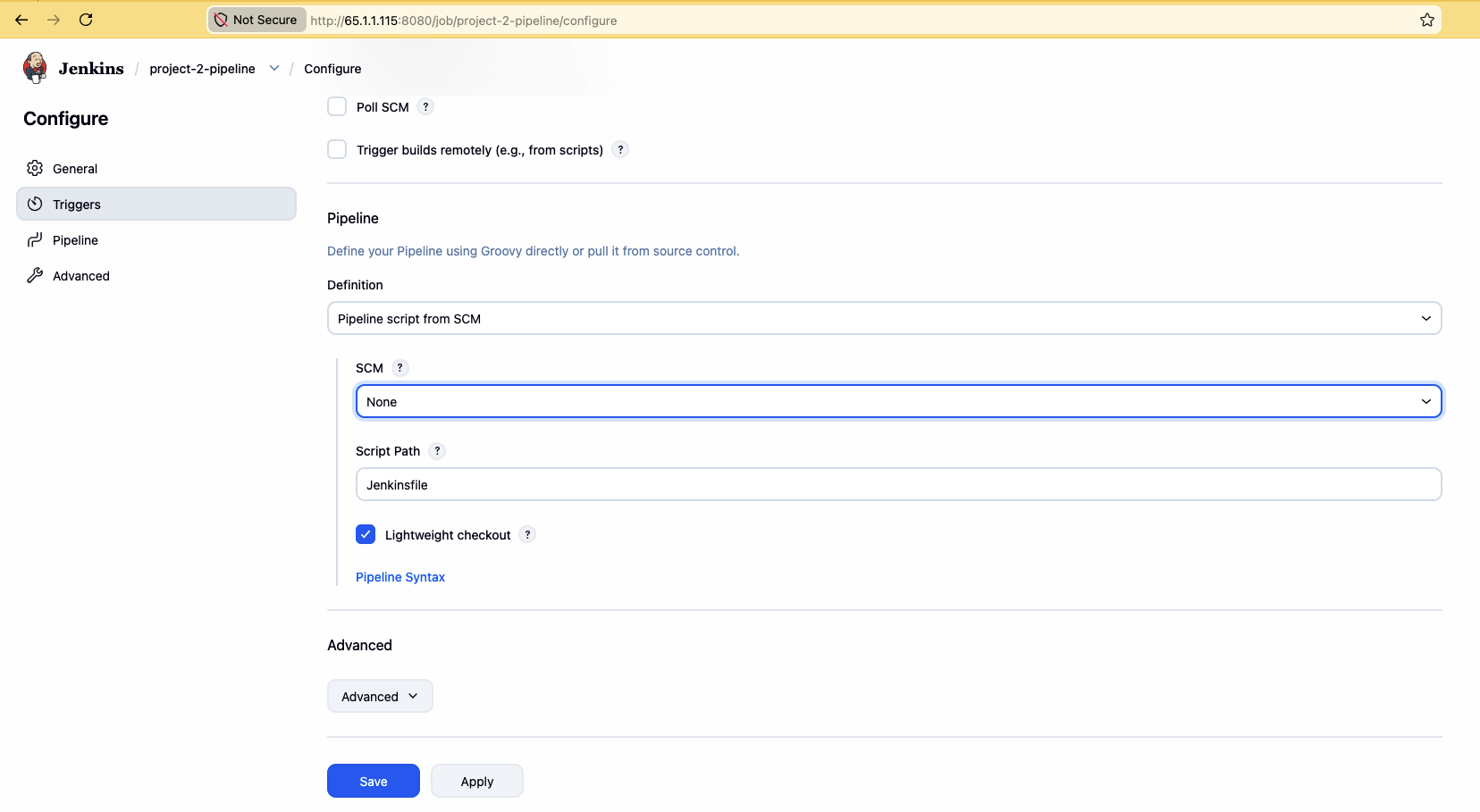
- SCM: Git
- Repository URL:
https://github.com/VenkatMastercoder/jenkins-cicd-projects.git - Select credentials
- Branch:
*/master(or*/main) - Script Path:
project-2-pipeline-jenkinsfile/Jenkinsfile - Save
Step 3 — Build
Click Build Now. Watch stages: Preparation → Install → Test → Deploy.
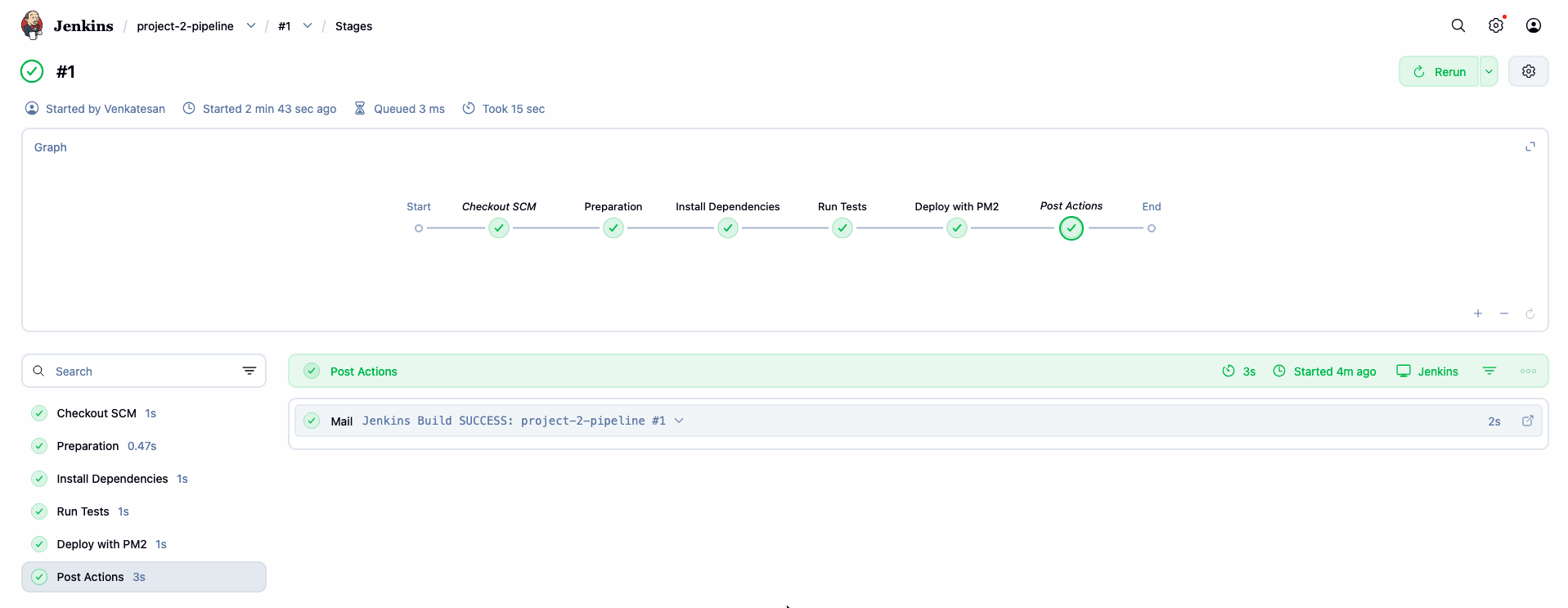
Open Console Output or the stage view if Blue Ocean / stage UI is available.
Step 4 — Optional: GitHub webhook (preview of Day 3)
- Manage Jenkins → Plugins → install GitHub if missing
- Job → Build Triggers → check GitHub hook trigger for GITScm polling
- On GitHub: repo → Settings → Webhooks → Add webhook
- Payload URL:
http://<your-ec2-public-ip>:8080/github-webhook/ - Content type:
application/json - Events: Just the push event
- Payload URL:
- Push a small commit — Jenkins should start automatically
Webhooks need inbound 8080 reachable from GitHub. For labs, opening 0.0.0.0/0 on 8080 is common; for production, restrict IPs or use a tunnel/reverse proxy.
What you achieved
Freestyle (UI)  →  Pipeline as Code (Jenkinsfile)
Install → Test → Deploy (PM2) → Email
Day 3 adds Docker build/push/deploy and hardens webhooks + credentials for a full CI/CD path.